KeptField is still being built. We’re choosing 3 to 5 founding shops to try it free.KeptField is still being built. Apply as a founding shop

See a whole day in two minutes

Follow one job from the first phone call to the customer’s thank-you. Press play for the guided tour, or step through at your own pace and try the screens yourself.Swipe through the nine steps.

Office

Sample Air Co.
TodayScheduleCustomersTeamReports
Thursday, Oct 1New job

Back to Today

Ruth Feld

Bayview Condos, Building C, Unit 312, Orlando, FL

(407) 555-0142. Customer since 2019. Yearly AC maintenance plan, renews Nov 2026.

At risk: 2 problem visits in the past 12 months

Schedule visitCallText

Site requirements

Add requirement

Shown to every tech on every visit. Required checks must be ticked off before “On my way.”

Maria is adding a note

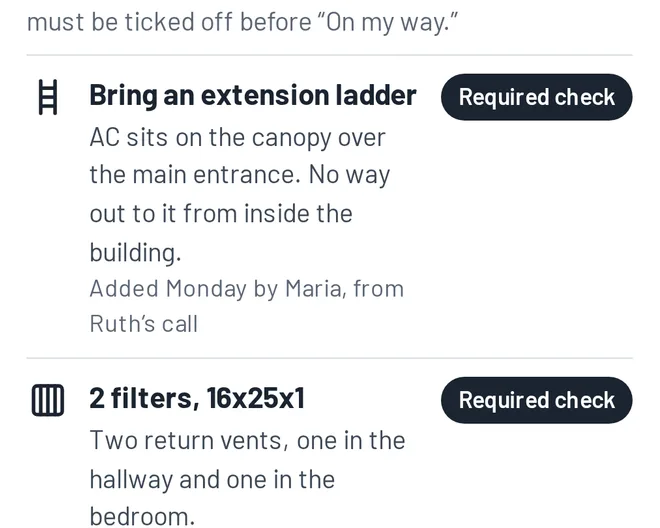
2 filters, 16x25x1

Two return vents, one in the hallway and one in the bedroom.

Required check

Call 30 minutes before arriving

Ruth needs time to get down to the lobby door.

Reminder on the way

Gate code 2580#

Visitor parking is next to Building C.

Info

Upcoming

Thu, Oct 1Yearly AC tune-up, 12–4 PM window, Luis P.Booked

Notes to check

Nothing to check.

Messages and notes

Mon 2:12 PM. Phone call, answered by Maria

Booked the yearly tune-up. Said the AC is on the entrance canopy and the tech needs a ladder.

Visit history

Sep 2025

Tune-up, done on the 3rd trip. The first tech came without a ladder.

Luis, technician

Luis’s phone

No jobs yet

Thursday’s schedule arrives at 6:00 AM

Site notes like Ruth’s ladder will be waiting on the job.

Ruth, customer

Sample Air Co.

Your company’s own number

No messages yet

Text message

Step 1: The office saves a site note. Maria says: Ruth just called to book her tune-up. Her AC sits on the canopy over the entrance, and the only way up is a ladder. I’m adding it to her profile as a required check.

Step 1 of 9. Monday, 2:15 PM

The office saves a site note

Mariaoffice manager

Maria, office manager

Ruth just called to book her tune-up. Her AC sits on the canopy over the entrance, and the only way up is a ladder. I’m adding it to her profile as a required check.

Ruth Feldcustomer

Behind the scenes: Notes live on the customer, not the appointment. This one shows up on every visit, for every tech, every year.

Best on a computer or tablet: the full demo shows the office and both phones side by side.

Step 1 of 9. Monday, 2:15 PM

The office saves a site note

Ruth’s profile in the office app, with the extension ladder saved as a required check

Maria, office managerRuth just called to book her tune-up. Her AC sits on the canopy over the entrance, and the only way up is a ladder. I’m adding it to her profile as a required check.

Behind the scenes: Notes live on the customer, not the appointment. This one shows up on every visit, for every tech, every year.

Step 2 of 9. Wednesday, 3:00 PM

The day before: an automatic reminder

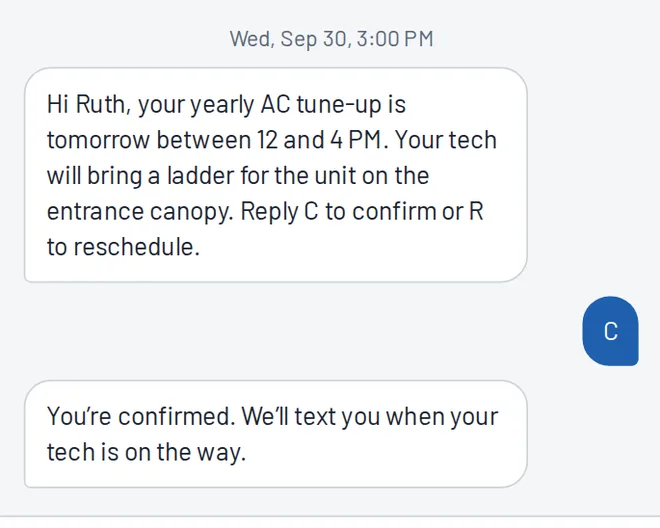
Ruth’s phone: the reminder text mentions the ladder, and she replies C to confirm

Ruth Feld, customerThe day before, I got a reminder text that already mentions the ladder. I just replied C to confirm.

Behind the scenes: Her reply is matched to the job and shows as confirmed in the office. If she replied R, the office would get a reschedule request instead.

Step 3 of 9. Thursday, 7:30 AM

Morning: Luis's day is ready

Luis’s phone: his day in order, with Ruth’s job flagged for a ladder

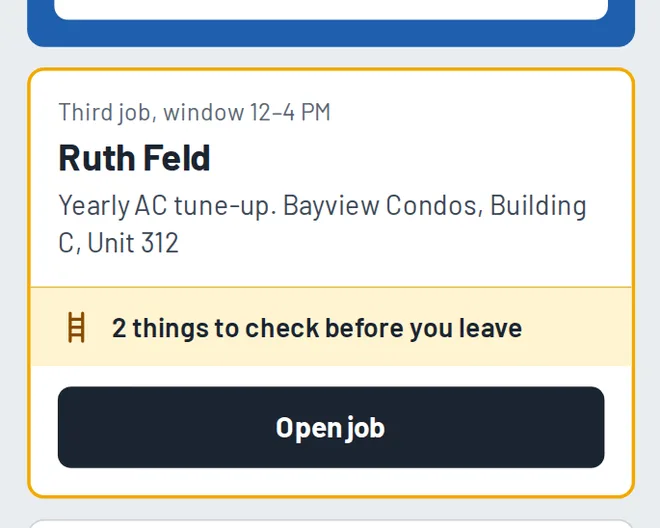
Luis, technicianMy day is ready when I open the app. Ruth’s job is flagged: 2 things to check before I leave for it.

Behind the scenes: The office sees every tech’s day on one board, and each job’s status updates as techs tap through their day.

Step 4 of 9. Thursday, 10:40 AM

A problem gets caught early

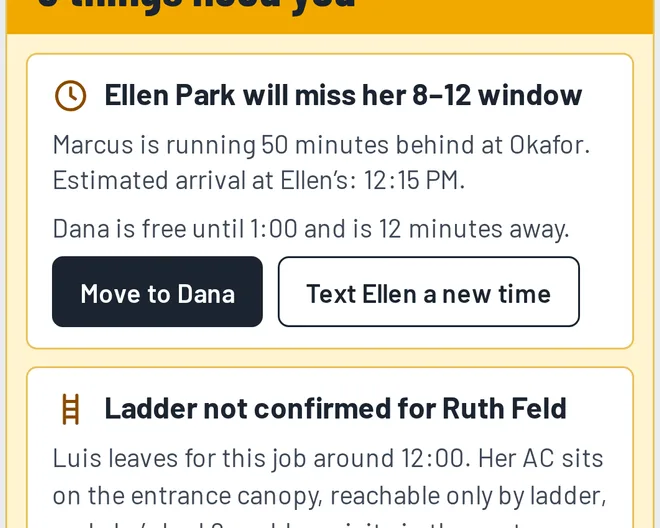
The office Today board: Ellen Park’s window is at risk, with a one-click fix ready

Maria, office managerIt’s 10:40. Marcus is running 50 minutes behind, so Ellen Park will miss her window. Dana is free and close. One click fixes it.

Behind the scenes: Moving the job texts Ellen her new arrival time. Without it, Ellen waits until noon and then calls you, upset.

Step 5 of 9. Thursday, 11:55 AM

Before he leaves: the required checks

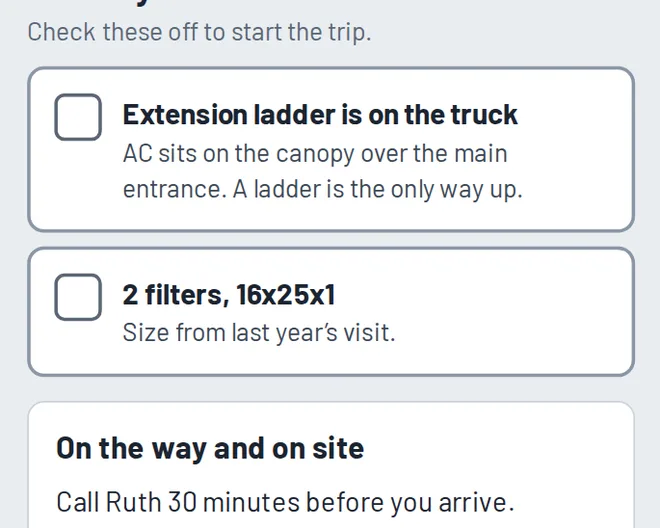
Luis’s phone: the two required checks that unlock On my way

Luis, technicianOn my way stays locked until I confirm the ladder and filters are on the truck. No more showing up without what the job needs.

Behind the scenes: If Luis hasn’t confirmed by the time he should leave, the office gets an alert while there’s still time to fix it.

Step 6 of 9. Thursday, 11:58 AM

Ruth gets a real arrival time

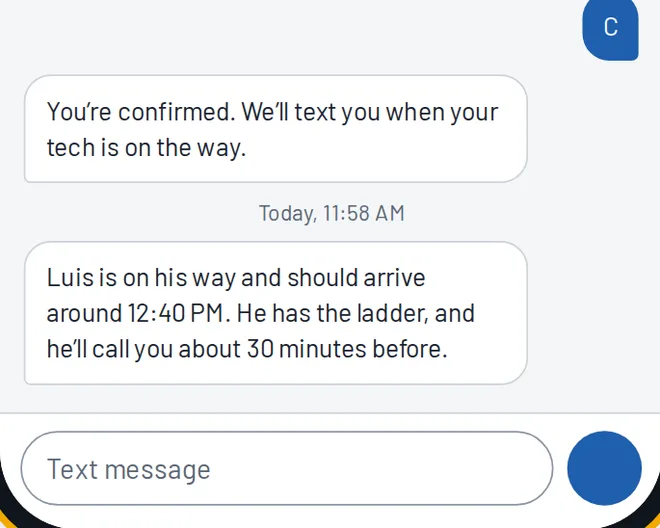
Ruth’s phone: a text with Luis’s arrival time

Ruth Feld, customerI got a text: Luis will be here around 12:40, and he has the ladder. He’ll even call 30 minutes ahead, like I asked.

Behind the scenes: Luis gets a reminder to call ahead because her profile asks for it. Nobody has to remember.

Step 7 of 9. Thursday, 1:50 PM

Finishing the job, without typing

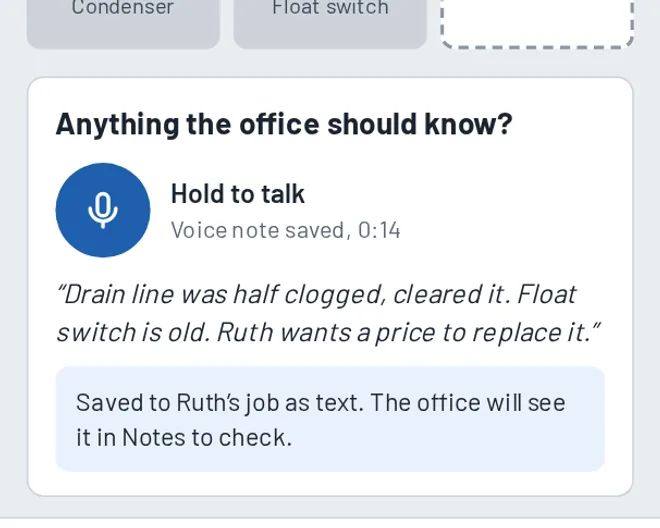
Luis’s phone: his voice note turned into text and saved for the office to check

Luis, technicianI tap what I did and leave a 14-second voice note: the float switch is old, and Ruth wants a price. No typing.

Behind the scenes: The voice note becomes text on Ruth’s job and lands in the office’s notes to check, so Maria sees she wants a price. Nothing depends on anyone’s memory.

Step 8 of 9. Thursday, 1:52 PM

Ruth gets a summary

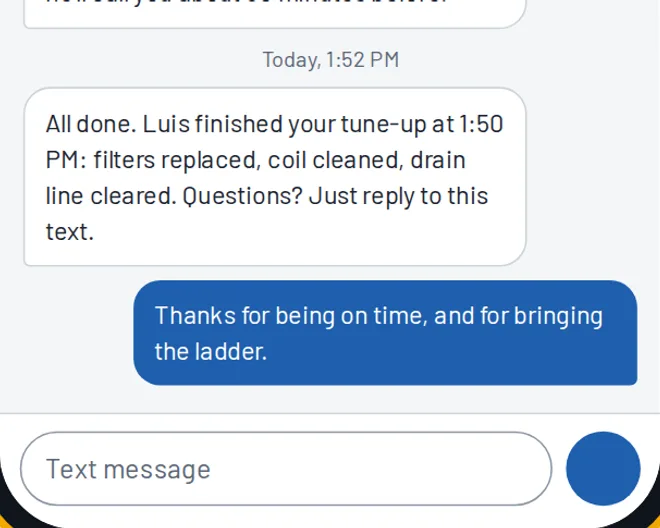
Ruth’s phone: the job summary text and her thank-you reply

Ruth Feld, customerThey texted me a summary of the visit right after Luis finished. On time, with the ladder, first try. I wrote back to say thanks.

Behind the scenes: Customer replies land in the office, on her profile. A question or a complaint shows up as an alert, so you can answer it the same day.

Step 9 of 9. Friday, 6:00 AM

Next morning: your brief

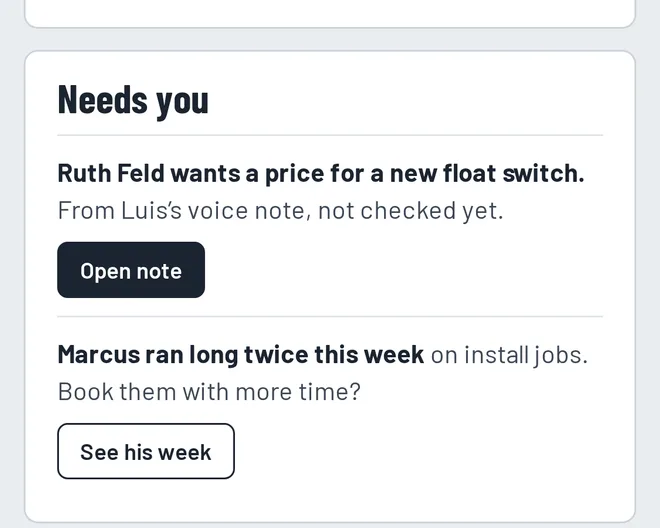
The owner’s morning brief: what needs him today, starting with the price Ruth asked for

Sam, ownerAt 6 AM my brief is on my phone: 17 of 17 jobs done, 1 window saved, and 2 things that need me. I hear about problems while I can still fix them.

Behind the scenes: That’s the point of KeptField: problems show up early, follow-ups don’t depend on memory, and customers stay.
1 of 9

The whole walkthrough

  1. The office saves a site note

    Ruth calls to book her yearly AC tune-up. Her unit sits on the canopy over her condo building’s entrance, and the only way up is a ladder. The office adds “Bring an extension ladder” to her profile and marks it as a required check.

    Notes live on the customer, not the appointment. This one shows up on every visit, for every tech, every year.

  2. The day before: an automatic reminder

    Ruth gets a text from your business number with her arrival window and a note that the tech is bringing a ladder. She replies C to confirm.

    Her reply is matched to the job and shows as confirmed in the office. If she replied R, the office would get a reschedule request instead.

  3. Morning: Luis's day is ready

    Luis opens the app and sees his jobs in order. Ruth's job is flagged: there are two things to check before he leaves for it.

    The office sees every tech’s day on one board, and each job’s status updates as techs tap through their day.

  4. A problem gets caught early

    Across town, Marcus is running 50 minutes behind and will miss Ellen Park's 8–12 window. The office sees it at 10:40, with a fix ready: Dana is free and 12 minutes away.

    Moving the job texts Ellen her new arrival time. Without it, Ellen waits until noon and then calls you, upset.

  5. Before he leaves: the required checks

    “On my way” stays locked until Luis confirms the ladder and filters are on the truck. Nobody shows up without what the job needs.

    If Luis hasn’t confirmed by the time he should leave, the office gets an alert while there’s still time to fix it.

  6. Ruth gets a real arrival time

    The moment Luis taps “On my way,” Ruth gets a text with his arrival time and a note that he has the ladder.

    Luis gets a reminder to call ahead because her profile asks for it. Nobody has to remember.

  7. Finishing the job, without typing

    Luis taps what he did, snaps a photo, and leaves a 14-second voice note: the float switch is old, and Ruth wants a price.

    The voice note becomes text on Ruth’s job and lands in the office’s notes to check, so Maria sees she wants a price. Nothing depends on anyone’s memory.

  8. Ruth gets a summary

    Ruth gets a short summary of the work as soon as Luis finishes. She replies to thank you for being on time.

    Customer replies land in the office, on her profile. A question or a complaint shows up as an alert, so you can answer it the same day.

  9. Next morning: your brief

    At 6 AM you get a short brief on your phone: what got done, what slipped, and what needs a decision today.

    That’s the point of KeptField: problems show up early, follow-ups don’t depend on memory, and customers stay.