Ellen Park will miss her 8–12 window
Marcus is running 50 minutes behind at Okafor. Estimated arrival at Ellen’s: 12:15 PM.
Dana is free until 1:00 and is 12 minutes away.
Move to DanaText Ellen a new time
Today
17 jobs: 5 done, 3 in progress, 9 still to go. 3 things need you.
Dispatch board
Yesterday
21 of 22 jobs done. One return trip at Jensen: the part wasn’t on the truck. One missed window, rescheduled for Friday.
Handled for you today
3 things need you
Ellen Park will miss her 8–12 window
Marcus is running 50 minutes behind at Okafor. Estimated arrival at Ellen’s: 12:15 PM.
Dana is free until 1:00 and is 12 minutes away.
Ladder not confirmed for Ruth Feld
Luis leaves for this job around 12:00. Her AC sits on the entrance canopy, reachable only by ladder, and she’s had 2 problem visits in the past year.
Note to check from Dana
“The capacitor at 1180 Elm Ct is weak. Customer wants a price to replace it.”
The office at 10:40 AM: one job is about to miss its window, one required check isn’t confirmed, and a tech left a note for the office to check. Each is one tap away.
Ruth Feld
Before you leave
Check these off to start the trip.
On the way and on site
Call Ruth 30 minutes before you arrive.
Gate code 2580#. Park next to Building C.
Heads up: last year’s visit took 3 trips. Ruth is on a yearly maintenance plan.
Check off 2 items to start the trip
Try it: tap both checks to unlock “On my way.”
KeptField is a simple office-and-phone app for service businesses with 2 to 25 techs. Customer notes become checklists your techs can’t skip, late jobs get flagged while there’s still time to fix them, and your customers get honest text updates.
Built for HVAC, plumbing, electrical, pest control, pool service, cleaning crews, and any business that sends people to job sites.
Most return trips start with something the customer already told the office: a gate code, a part, a dog in the yard, a unit that needs a ladder. The note gets saved. Nothing makes sure it reaches the tech.
One example: a customer’s AC sits on the canopy over her condo building’s entrance. There’s no way out to it from inside, so the tech needs a ladder, and she reminds the office every year. Here’s how that visit often goes, and how it goes with KeptField.
The note
What usually happens
The note sits in a field nobody reads. The tech shows up at 7:30 PM without a ladder and can’t reach the unit.
With KeptField
Notes like this become required checks. The tech can’t tap “On my way” until the ladder is on the truck.
The window
What usually happens
The 8–12 window comes and goes. The customer waits all morning, then calls you to ask where the tech is.
With KeptField
By mid-morning you see the window is at risk, with a one-tap fix: move the job to a free tech, or text the customer a new time.
The repeat
What usually happens
Next year it happens again. After three trips she switches companies, and you never find out why.
With KeptField
Repeat problems are flagged on her profile and in your morning brief, so you can step in before she leaves.
Follow one job from the first phone call to the customer’s thank-you. Press play for the guided tour, or step through at your own pace and try the screens yourself.Swipe through the nine steps.
Office
Back to Today
Ruth Feld
Bayview Condos, Building C, Unit 312, Orlando, FL
(407) 555-0142. Customer since 2019. Yearly AC maintenance plan, renews Nov 2026.
At risk: 2 problem visits in the past 12 months
Site requirements
Add requirementShown to every tech on every visit. Required checks must be ticked off before “On my way.”
2 filters, 16x25x1
Two return vents, one in the hallway and one in the bedroom.
Call 30 minutes before arriving
Ruth needs time to get down to the lobby door.
Gate code 2580#
Visitor parking is next to Building C.
Upcoming
Notes to check
Nothing to check.
Messages and notes
Booked the yearly tune-up. Said the AC is on the entrance canopy and the tech needs a ladder.
Visit history
Tune-up, done on the 3rd trip. The first tech came without a ladder.
Luis, technician
No jobs yet
Thursday’s schedule arrives at 6:00 AM
Site notes like Ruth’s ladder will be waiting on the job.
Ruth, customer
Sample Air Co.
Your company’s own number
No messages yet
Step 1: The office saves a site note. Maria says: Ruth just called to book her tune-up. Her AC sits on the canopy over the entrance, and the only way up is a ladder. I’m adding it to her profile as a required check.
Maria, office manager
Ruth just called to book her tune-up. Her AC sits on the canopy over the entrance, and the only way up is a ladder. I’m adding it to her profile as a required check.
Behind the scenes: Notes live on the customer, not the appointment. This one shows up on every visit, for every tech, every year.
Best on a computer or tablet: the full demo shows the office and both phones side by side.
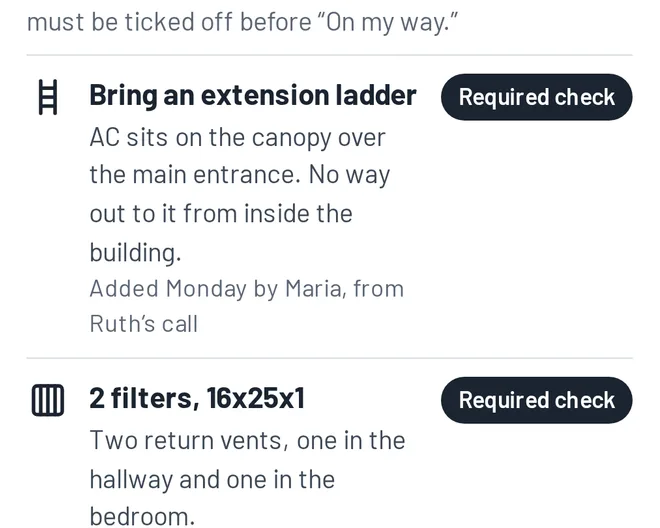
Maria, office managerRuth just called to book her tune-up. Her AC sits on the canopy over the entrance, and the only way up is a ladder. I’m adding it to her profile as a required check.
Behind the scenes: Notes live on the customer, not the appointment. This one shows up on every visit, for every tech, every year.
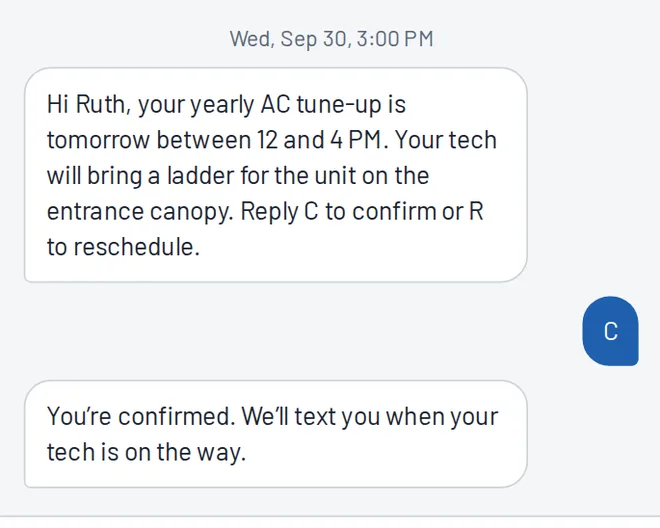
Ruth Feld, customerThe day before, I got a reminder text that already mentions the ladder. I just replied C to confirm.
Behind the scenes: Her reply is matched to the job and shows as confirmed in the office. If she replied R, the office would get a reschedule request instead.
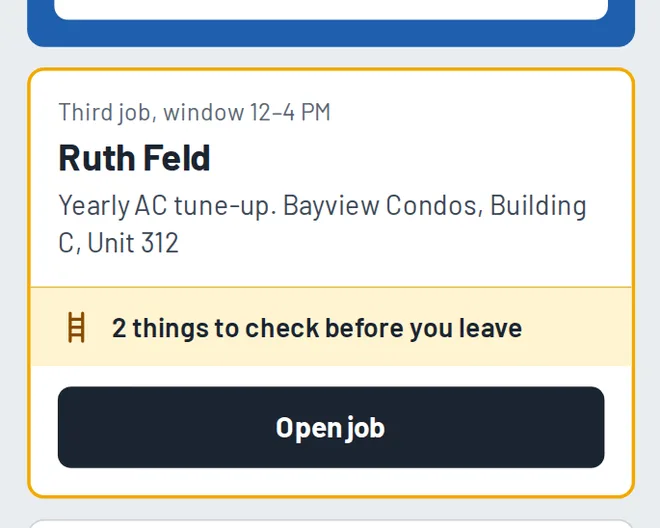
Luis, technicianMy day is ready when I open the app. Ruth’s job is flagged: 2 things to check before I leave for it.
Behind the scenes: The office sees every tech’s day on one board, and each job’s status updates as techs tap through their day.
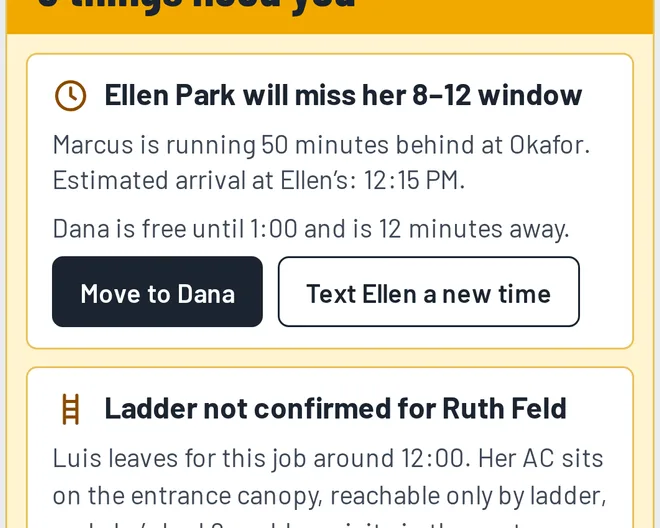
Maria, office managerIt’s 10:40. Marcus is running 50 minutes behind, so Ellen Park will miss her window. Dana is free and close. One click fixes it.
Behind the scenes: Moving the job texts Ellen her new arrival time. Without it, Ellen waits until noon and then calls you, upset.
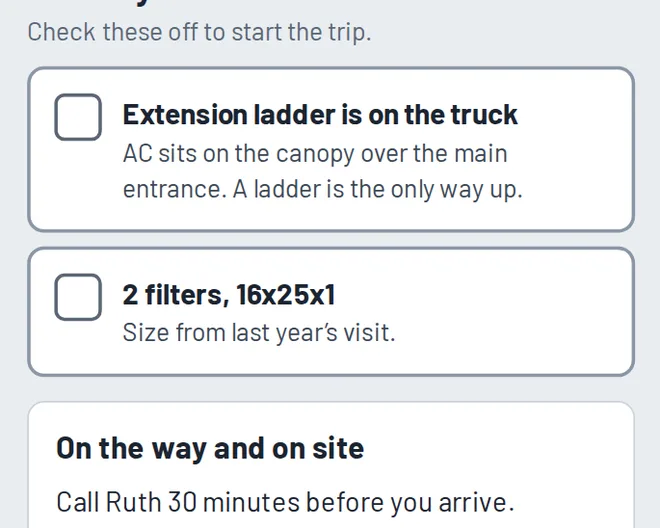
Luis, technicianOn my way stays locked until I confirm the ladder and filters are on the truck. No more showing up without what the job needs.
Behind the scenes: If Luis hasn’t confirmed by the time he should leave, the office gets an alert while there’s still time to fix it.
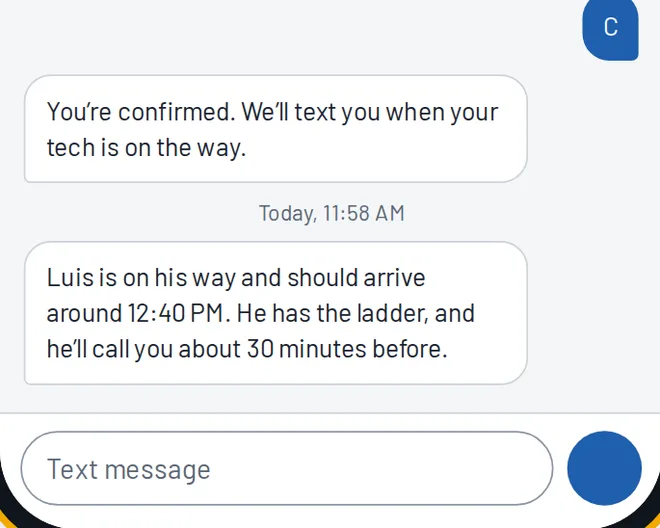
Ruth Feld, customerI got a text: Luis will be here around 12:40, and he has the ladder. He’ll even call 30 minutes ahead, like I asked.
Behind the scenes: Luis gets a reminder to call ahead because her profile asks for it. Nobody has to remember.
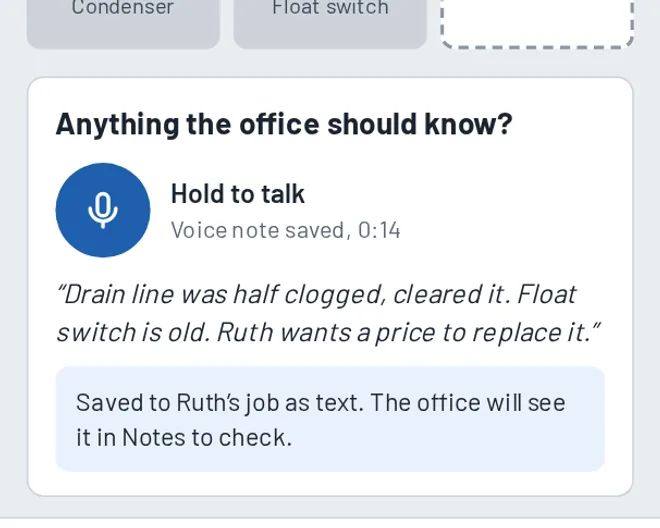
Luis, technicianI tap what I did and leave a 14-second voice note: the float switch is old, and Ruth wants a price. No typing.
Behind the scenes: The voice note becomes text on Ruth’s job and lands in the office’s notes to check, so Maria sees she wants a price. Nothing depends on anyone’s memory.
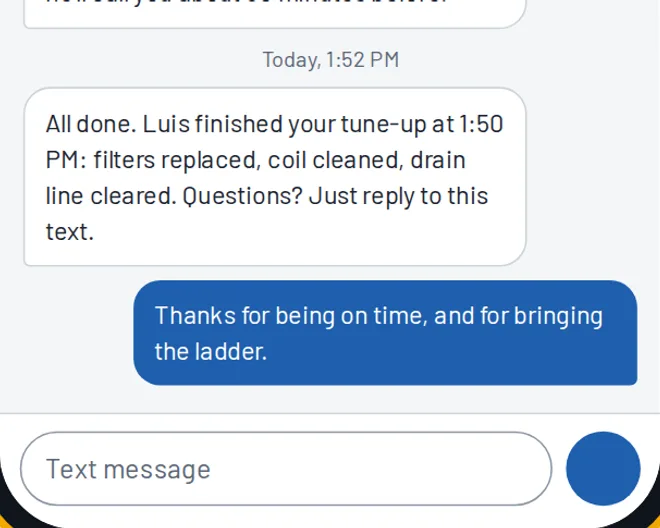
Ruth Feld, customerThey texted me a summary of the visit right after Luis finished. On time, with the ladder, first try. I wrote back to say thanks.
Behind the scenes: Customer replies land in the office, on her profile. A question or a complaint shows up as an alert, so you can answer it the same day.
Sam, ownerAt 6 AM my brief is on my phone: 17 of 17 jobs done, 1 window saved, and 2 things that need me. I hear about problems while I can still fix them.
Behind the scenes: That’s the point of KeptField: problems show up early, follow-ups don’t depend on memory, and customers stay.
1 of 9
Three views of the same job: your office, your tech’s phone, and your customer’s texts. Everything anyone says about a job lands in one place.
See who is where, what’s done, and what’s running long. Jobs update as techs tap through their day, so nobody has to call around for status.
When a job is about to miss its window, a required item isn’t checked off, or a tech leaves a note that needs action, it shows up with a one-tap fix. Every morning you also get a brief on your phone.
Today
17 jobs: 5 done, 3 in progress, 9 still to go. 3 things need you.
Dispatch board
Yesterday
21 of 22 jobs done. One return trip at Jensen: the part wasn’t on the truck. One missed window, rescheduled for Friday.
Handled for you today
3 things need you
Ellen Park will miss her 8–12 window
Marcus is running 50 minutes behind at Okafor. Estimated arrival at Ellen’s: 12:15 PM.
Dana is free until 1:00 and is 12 minutes away.
Ladder not confirmed for Ruth Feld
Luis leaves for this job around 12:00. Her AC sits on the entrance canopy, reachable only by ladder, and she’s had 2 problem visits in the past year.
Note to check from Dana
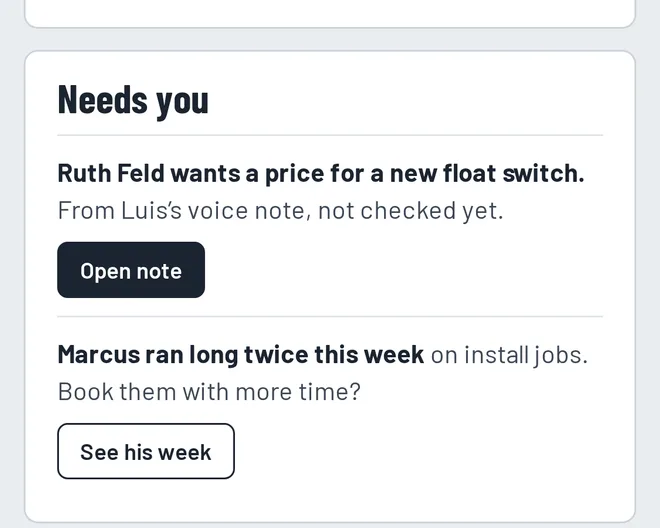
“The capacitor at 1180 Elm Ct is weak. Customer wants a price to replace it.”
Ladder needed, gate codes, call ahead, filter sizes, the dog in the backyard. Write it once and every tech sees it on every visit, year after year. Mark the important ones as required checks, and the tech can’t start the trip until they’re confirmed.
Ruth Feld
Bayview Condos, Building C, Unit 312
2 problem visits this year
Site requirements
Shown to every tech, on every visit.
Bring an extension ladder
AC sits on the canopy over the main entrance. No way out to it from inside.
Call 30 minutes before arriving
She needs time to get to the lobby door.
Gate code 2580#
Visitor parking is next to Building C.
Big buttons, a few screens, and almost no typing. Works on iPhone and Android.
Your day, Luis
Working now
Ward
AC not cooling. Started 9:52 AM.
Finish jobShah
Thermostat install, 2:30 to 4:00 PM
Grant
Done at 9:20 AM. Summary sent to customer.
Ruth Feld
Before you leave
Check these off to start the trip.
On the way and on site
Call Ruth 30 minutes before you arrive.
Gate code 2580#. Park next to Building C.
Heads up: last year’s visit took 3 trips. Ruth is on a yearly maintenance plan.
Check off 2 items to start the trip
Finish job
What did you do?
Photos
Anything the office should know?
Hold to talk
Voice note saved, 0:14
“Drain line was half clogged, cleared it. Float switch is old. Ruth wants a price to replace it.”
Saved to Ruth’s job as text. The office will see it in Notes to check.
Ruth gets a summary text when you finish.
Honest updates from your own business number:
Replies go straight to your office, not to a tech’s personal phone.
Sample Air Co.
Your company’s own number
You’re confirmed. We’ll text you when your tech is on the way.
Today, 11:58 AM
Luis is on his way and should arrive around 12:40 PM. He has the ladder, and he’ll call you about 30 minutes before.
Today, 1:52 PM
All done. Luis finished your tune-up at 1:50 PM: filters replaced, coil cleaned, drain line cleared. Questions? Just reply to this text.
Thanks for being on time, and for bringing the ladder.
You hear about a late job at 10:40, not when the customer calls at noon.
Site notes and required checks follow the customer, no matter which tech goes or who answered the phone.
A few taps per job and a voice note at the end. If they can text, they can use it.
They know when you’re coming, so the office spends less time answering “where’s my tech?” calls.
Plans are priced by crew size, not per user. Adding a tech doesn’t change your bill until you outgrow your plan.
KeptField handles jobs, people, and follow-through. Keep using your invoicing and accounting tools.
Take a closer look at each feature:
See how KeptField fits your kind of work.
One monthly price for your whole crew, month to month, with no contract.
Planned prices. KeptField is still being built. We’re choosing 3 to 5 founding shops to try it free during a pilot and help shape it. Founding shops get a lower price when it launches.
For owner-operators with a small team.
$39per month
Best for growing shops
For busy crews with someone running the office.
$79per month
For multiple crews and dispatchers.
$129per month
More than 25 techs? Let’s talk.
Want automatic texts from your business number? See texting packs and full pricing.
KeptField is still being built, and the first shops to use it will shape it.
Walk through a full day in about two minutes and see if it fits how you work.
Tell us your trade, crew size and what you use now. We’re choosing 3 to 5 shops to shape the app.
When your pilot starts, send a customer list or spreadsheet. We’ll add site notes like ladders, gate codes, and call-aheads with you.
Your techs install the app in a few minutes, and you keep your current system the whole time. Founding shops get a lower price at launch, and every plan will start with a 30-day free trial.
Not yet. KeptField is still being built. We're choosing 3 to 5 founding shops to try it free during a pilot and help shape it, and founding shops get a lower price when it launches. Use the contact form to apply.
No. They tap through checklists and leave voice notes, and KeptField turns those notes into text the office can read.
No. KeptField focuses on jobs, people, and follow-through. Keep the tools you already use for money.
With a texting pack, your own business number, so customers recognize it. Without one, techs send one-tap texts from their own phones.
No. The office side runs on the PC, laptop, or tablet you have, and techs use their own iPhone or Android phone.
Any business that sends people to job sites: HVAC, plumbing, electrical, pest control, pool service, house and carpet cleaning, lawn care, appliance repair, garage doors, window cleaning, handyman work, and similar trades with 2 to 25 techs.
Questions about your trade or your crew size, or want to be one of the founding shops? Send a message and we’ll reply by email.